












在 React Native 中基于 MathJax 实现文字与数学公式混排
React Native(RN)本身没有内置的LaTeX渲染能力,而MathJax作为成熟的公式渲染库,是解决这个问题的最佳选择之一。

着急的话可以直接去看 组件完整代码
在普通网页中用MathJax渲染LaTeX公式
在RN中集成前,我们先从最基础的网页场景入手,理解 MathJax 的核心用法,因为RN中我们本质上是通过 WebView 来运行 MathJax。
核心实现思路
- 引入 MathJax 的 js 文件
- 配置 MathJax 的渲染规则(如行内公式的分隔符)
- 在HTML中写入 LaTeX 公式内容
基础代码示例
重点说明
tex-svg.js是 MathJax 的 SVG 渲染版本,也可以选择tex-mml-chtml.js( HTML 渲染):- HTML 模式:依赖外部 WebFonts 字体文件。在 React Native 中通过
file:///android_asset/加载时,浏览器可能因为安全策略拦截字体请求,导致公式显示为 fallback 字体。 - SVG 模式:将公式直接转换为内联的
<path>路径。它不依赖任何外部字体文件,只要 JS 加载成功,公式就能完美显示,完全不存在“字体显示不出”的兼容性问题。
- HTML 模式:依赖外部 WebFonts 字体文件。在 React Native 中通过
inlineMath配置决定了哪些符号包裹的内容会被识别为行内公式,可以根据需要自定义分隔符,如$公式$或\(公式\);
在 RN 中配置 MathJax 本地文件
为了方便打包后离线场景可用,我们不能直接使用 CDN 获取 js 文件,因此需要将 MathJax 文件放到项目本地,分 iOS 和 Android 两个平台配置。
步骤1:下载MathJax文件
从 jsdelivr
下载 tex-svg.js 文件。
步骤2:分平台放置文件
Android 配置
- 将
tex-svg.js复制到@/android/app/src/main/assets/mathjax下。
iOS 配置(来自 AI ,没有测试,可能有误)
- 将 MathJax 的
es5目录拖入 Xcode 的项目工程中(建议放到Resources目录); - 勾选「Copy items if needed」和对应的 Target,确保文件被打包进 App;
- iOS中访问本地文件的路径为相对路径(无需
file://前缀)。
步骤3:RN中获取平台对应的MathJax路径
import { Platform } from 'react-native';

// 根据平台拼接MathJax核心脚本路径
const mathJaxPath = Platform.OS === 'android'
  ? 'file:///android_asset/mathjax/tex-svg.js'
: 'MathJax/es5/tex-svg.js';在 RN 中封装组件:核心逻辑实现
基于 react-native-webview 和 MathJax,我们封装一个可复用的 TextWithLatex 组件,核心解决两个问题:公式渲染、高度自适应(避免WebView高度固定导致内容截断/留白)。
组件基础结构与Props定义
先定义组件的入参,为了让 WebView 中的公式看起来更像是原生组件,我决定让它支持自定义文本颜色、背景色、字体大小等:
import React, { useState } from 'react';
import { Platform, StyleSheet, View, ViewStyle } from 'react-native';
import { WebView, WebViewMessageEvent } from 'react-native-webview';

// 定义组件Props类型
interface LatexSvgProps {
  content: string; // 包含LaTeX公式的文本内容
  textColor?: string; // 文本/公式颜色
  backgroundColor?: string; // 背景色
  fontSize?: number; // 字体大小
  style?: ViewStyle; // 自定义样式
}

// 组件入口
const TextWithLatex: React.FC<LatexSvgProps> = ({
  content,
  textColor = '#000000',
  backgroundColor = '#ffffff',
  fontSize = 16,
  style = {},
}) => {
  // ...此处省略后续逻辑,先定义基础结构
};

export default TextWithLatex;高度自适应
WebView 的高度默认固定,公式渲染后高度可能变化,因此需要:
- 用
useState维护 WebView 的动态高度; - 在 MathJax 渲染完成后,计算 HTML 内容的实际高度,通过
postMessage传递给RN; - RN 接收高度后更新 WebView 容器高度。
// 状态:存储计算出的高度,初始给一个较小值
const [webViewHeight, setWebViewHeight] = useState(fontSize * 2);

// 接收来自WebView的高度数据
const onMessage = (event: WebViewMessageEvent) => {
  const height = Number(event.nativeEvent.data);
  if (height) {
    setWebViewHeight(height);
  }
};

// HTML模板:核心是MathJax配置+高度计算逻辑
const htmlTemplate = `
  <!DOCTYPE html>
  <html>
    <head>
      <meta name="viewport" content="width=device-width, initial-scale=1.0, maximum-scale=1.0, user-scalable=no">
      <style>
        // ...此处省略样式配置(见完整代码)
      </style>
      <script>
        window.MathJax = {
          tex: { inlineMath: [['$', '$'], ['\\\\(', '\\\\)']] },
          svg: { fontCache: 'global' },
          startup: {
            pageReady: () => {
              // MathJax渲染完成后执行
              return MathJax.startup.defaultPageReady().then(() => {
                // 延迟执行:确保渲染完全完成
                setTimeout(sendHeight, 100);
              });
            }
          }
        };

        // 计算高度并发送给RN
        function sendHeight() {
          const height = document.getElementById('content-wrapper').scrollHeight;
          window.ReactNativeWebView.postMessage(height.toString());
        }

        // 窗口尺寸变化时重新计算(适配屏幕旋转)
        window.addEventListener('resize', sendHeight);
      </script>
      <script id="MathJax-script" src="${mathJaxPath}"></script>
    </head>
    <body>
      <div id="content-wrapper">
        ${content.replace(/\n/g, '<br/>')}
      </div>
    </body>
  </html>
`;组件返回结构
最终返回包含WebView的容器,绑定动态高度和事件:
return (
  <View style={[styles.container, { height: webViewHeight }, style]}>
    <WebView
      originWhitelist={['*']} // 允许所有源(本地文件必须)
      source={{ html: htmlTemplate }}
      onMessage={onMessage} // 接收高度消息
      scrollEnabled={false} // 禁用WebView滚动(由RN容器控制)
      allowFileAccess={true} // 允许访问本地文件
      javaScriptEnabled={true} // 必须开启JS
      style={{ backgroundColor: 'transparent' }} // 透明背景
    />
  </View>
);

// 基础样式
const styles = StyleSheet.create({
  container: {
    width: '100%',
    overflow: 'hidden',
  },
});组件使用示例
封装完成后,使用方式非常简单,只需传入包含LaTeX公式的content即可:
import React from 'react';
import { View, StyleSheet } from 'react-native';
import TextWithLatex from './TextWithLatex';

const App = () => {
  return (
    <View style={{flex: 1}}>
      <TextWithLatex
        content="行内公式:$E=mc^2$,块级公式:$$\int_{a}^{b} f(x) dx$$"
        fontSize={18}
        textColor="#333333"
      />
    </View>
  );
};

export default App;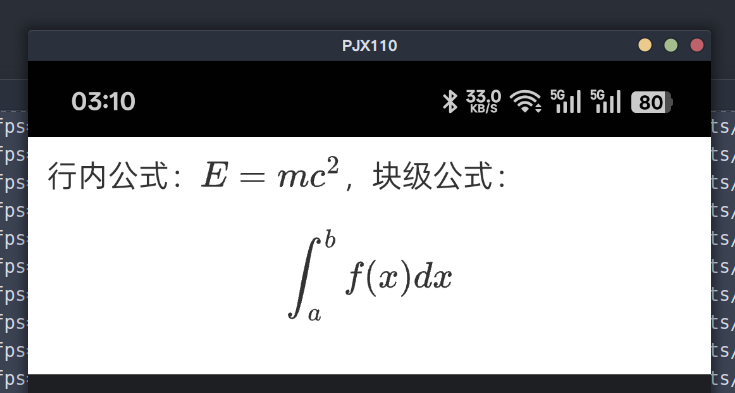
完整组件代码
以下是TextWithLatex.tsx的完整代码,可直接复制使用(需确保已安装react-native-webview):
import React, { useState } from 'react';
import { Platform, StyleSheet, View, ViewStyle } from 'react-native';
import { WebView, WebViewMessageEvent } from 'react-native-webview';

interface TextWithLatexProps {
  content: string;
  textColor?: string;
  backgroundColor?: string;
    fontSize?: number;
    style?: ViewStyle;
}

const TextWithLatex: React.FC<TextWithLatexProps> = ({
  content,
  textColor = '#000000',
  backgroundColor = '#ffffff',
    fontSize = 16,
  style = {},
}) => {
  // 状态:存储计算出的高度,初始给一个较小值
  const [webViewHeight, setWebViewHeight] = useState(fontSize * 2);

  const mathJaxPath = Platform.OS === 'android'
    ? 'file:///android_asset/mathjax/tex-svg.js'
    : 'MathJax/tex-svg.js';

  // 接收来自 WebView 的高度数据
  const onMessage = (event: WebViewMessageEvent) => {
    const height = Number(event.nativeEvent.data);
    if (height) {
      setWebViewHeight(height);
    }
  };

  const htmlTemplate = `
    <!DOCTYPE html>
    <html>
      <head>
        <meta name="viewport" content="width=device-width, initial-scale=1.0, maximum-scale=1.0, user-scalable=no">
        <style>
          body {
            font-family: -apple-system, sans-serif;
            font-size: ${fontSize}px;
            color: ${textColor};
            background-color: ${backgroundColor};
            margin: 0;
            line-height: 1.2;
            overflow: hidden; /* 禁用 body 滚动,由原生容器控制 */
          }
          #content-wrapper {
            padding: 10px;
            display: inline-block;
            width: 100%;
            box-sizing: border-box;
          }
          mjx-container { color: ${textColor} !important; fill: currentColor; }
        </style>
        <script>
          window.MathJax = {
            tex: { inlineMath: [['$', '$'], ['\\\\(', '\\\\)']] },
            svg: { fontCache: 'global' },
            startup: {
              pageReady: () => {
                return MathJax.startup.defaultPageReady().then(() => {
                  // 公式渲染完成后,计算实际高度并发送给 RN
                  setTimeout(sendHeight, 100);
                });
              }
            }
          };

          function sendHeight() {
            const height = document.getElementById('content-wrapper').scrollHeight;
            window.ReactNativeWebView.postMessage(height.toString());
          }

          // 窗口尺寸变化时重新计算
          window.addEventListener('resize', sendHeight);
        </script>
        <script id="MathJax-script" src="${mathJaxPath}"></script>
      </head>
      <body>
        <div id="content-wrapper">
          ${content.replace(/\n/g, '<br/>')}
        </div>
      </body>
    </html>
  `;

  return (
    <View style={[styles.container, { height: webViewHeight }, style]}>
      <WebView
        originWhitelist={['*']}
        source={{ html: htmlTemplate }}
        onMessage={onMessage}
        scrollEnabled={false}
        allowFileAccess={true}
        javaScriptEnabled={true}
        style={{ backgroundColor: 'transparent' }}
      />
    </View>
  );
};

const styles = StyleSheet.create({
  container: {
    width: '100%',
    overflow: 'hidden',
  },
});

export default TextWithLatex;性能优化
MathJax渲染有一定耗时,建议通过正则表达式判断是否真的有公式 再用 WebView 渲染,避免无意义的渲染;
const hasMathFormula = (text:string) => {
  if (!text || typeof text !== 'string') return false;
  // 正则匹配规则:
  // 1. $...$ 行内公式
  // 2. \(...\) 行内公式
  // 3. \[...\] 块级公式
  const mathRegex = /(\$[^$]+\$)|(\\\([\s\S]+?\\\))|(\\\[[\s\S]+?\\\])/;
  return mathRegex.test(text);
};
暂时还没有评论哦